Shopify SEO: The 2026 Guide to Ranking Your Store
Shopify SEO explained: what the platform does for you, the duplicate URL quirk, why collection pages win, and a prioritised checklist for 2026.
Most Shopify stores are not losing on SEO because the platform is weak. They are losing because they never touched the parts Shopify leaves to them. Shopify SEO is really two jobs: the technical plumbing the platform already handles well, and the strategy work it cannot do for you, which is where almost every store we audit falls short.
Below: what Shopify does automatically, the platform quirks that trip up even experienced developers, and a prioritised checklist for this month. One honest warning: the keywords that make you money are your category terms, and those are won on collection pages long before a blog post ranks for anything.
What Shopify SEO Handles for You (and What It Doesn't)
Yes, Shopify has built-in SEO, and it is better than most people assume. According to Shopify's own SEO overview, every store automatically gets:
- A sitemap.xml that lists your products, primary product images, pages, collections and blog posts, updated every time you add something.
- A robots.txt file that keeps crawlers out of the admin, cart, checkout and account pages.
- Auto-generated canonical tags to stop duplicate versions of a page competing in search.
- SSL on by default, plus title tags generated by your theme.
- Editable titles, meta descriptions and URL handles for every product, collection, page and blog post, in the "Search engine listing" section at the bottom of each editor.
What it does not do is the part that decides rankings. Shopify will not pick your keywords, write a collection page worth ranking, fix imported supplier descriptions, or stop last year's apps from slowing every page. The tools are there. The thinking is on you.
The URL Structure You Can't Change, and the Duplicate You Probably Created
Shopify forces fixed prefixes on every URL. Products live at /products/, collections at /collections/, pages at /pages/ and blog posts at /blogs/. You can edit the handle after the last slash, but not the folder. Stop paying anyone who promises to "fix" this. It is the same for every store on the platform and Google handles it fine.
The real issue is quieter. Shopify can serve the same product at two addresses: /products/merino-crew-sock and a collection-path version at /collections/socks/products/merino-crew-sock. Some themes build the second one with a Liquid filter called within, and Shopify's developer documentation flags the SEO cost directly: the standard product page and the collection version "have the same content on separate URLs."
Shopify's canonical tag does the damage control. On a live Canadian store we checked this week, the collection-path product URL carried a canonical pointing back to the clean /products/ address. But a canonical is a hint, not a command, and every internal link to the duplicate still splits crawl attention.
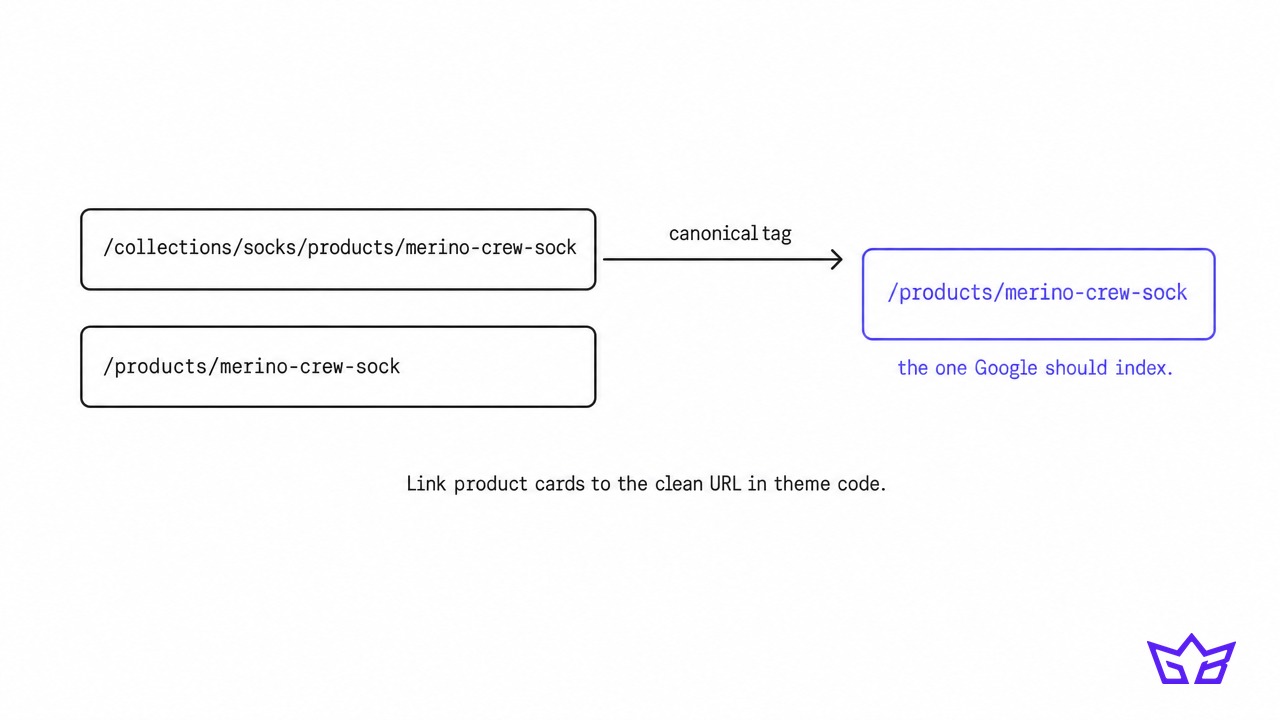 The fix: have your developer update the product card snippet in your theme so links use the plain product URL, not the collection-scoped one. It is usually a one-line change, and it removes the duplicate at the source instead of relying on the canonical.
Collection Pages Are Your Real Ranking Asset
Here is the opinion most Shopify SEO guides dodge: your collection pages matter more than your blog, and usually more than your product pages.
Someone typing "women's merino base layers" wants a range to compare, not a single product or a 2,000 word article, which is why retail category searches tend to return collection pages. If yours is a bare grid of 24 tiles with a one-word heading, you are handing that search to a competitor who wrote 150 useful words above the grid.
A collection page that can rank has:
- A heading and title built around the category keyword, for example "Women's Merino Base Layers" rather than "Tops".
- A short intro of 80 to 200 words that answers what a buyer is weighing: fabric weight, fit, who it is for.
- Internal links to related collections and your best-selling products.
- A few FAQs further down the page covering sizing, shipping to Canada, or care. These also give AI search tools clean answers to quote.
Takeaway: list your top 10 collections by revenue, then find the search term each one should own. That list is your SEO roadmap for the next quarter, and it will outperform a content calendar almost every time.
Product Pages: Stop Publishing the Manufacturer's Description
If you resell brands, the fastest win on the whole site is usually rewriting product copy. When 40 retailers publish the same supplier description word for word, Google has no reason to rank your version over theirs. Your page is just one more copy.
Start with the 50 products that drive the most revenue and add what supplier copy lacks: who it suits, how it compares to the next model up, real sizing notes, and answers to the questions your support inbox keeps getting.
While you are in each product, use the "Search engine listing" section properly:
- Page title: Shopify accepts up to 70 characters, but its own help centre suggests keeping titles around 60 so they are not cut off.
- Meta description: write a real reason to click. Shopify warns that descriptions over 320 characters may be truncated, and Google often shows far less.
- Image alt text: describe what is in the photo in plain words ("black merino crew sock, side view"), not a string of keywords.
- URL handle: keep it short and descriptive. If you change it, leave the "Create a URL redirect" box ticked so the old address forwards to the new one. Standard plans allow up to 100,000 redirects, so there is no reason to let an old URL 404.
Filters, Tags and Sort Orders: The Crawl Trap
Every filter and sort option on a collection can create a new URL. Multiply colour, size and price across 30 collections and you get thousands of near-identical pages for Google to crawl.
Shopify already blocks the worst of it. The default robots.txt rules we reviewed on live stores disallow sort URLs (sort_by), tag combinations joined with a plus sign, and URLs that stack two or more filters. On a standard theme, a filtered collection also carries a canonical back to the unfiltered collection. Single-filter URLs are still crawlable, which is usually fine.
Before you edit robots.txt.liquid, read Shopify's own warning: incorrect use "can result in loss of all traffic," and Shopify Support will not help you undo it. Add rules inside the Liquid template rather than replacing it with plain text, so Shopify can keep updating the defaults.
The exception worth making: if a filtered view has real search demand, such as "black running shoes," do not rely on a filter URL to rank. Build it as its own collection with its own title, intro and handle.
Speed, Apps and Structured Data: Where Themes Quietly Cost You
Shopify hosting is fast. Stores get slow because of what gets bolted on. Every review widget, upsell popup and chat bubble loads its own scripts, and many apps leave code behind after you uninstall them. We regularly find stores loading scripts for apps cancelled a year ago.
Google judges speed through Core Web Vitals: Largest Contentful Paint under 2.5 seconds, Interaction to Next Paint under 200 milliseconds and Cumulative Layout Shift under 0.1. Our breakdown of ecommerce Core Web Vitals covers what to fix first. The short version for Shopify: audit apps, remove leftover code, compress hero images, and test on a real phone.
Structured data needs the same scrutiny. Shopify themes can output Product markup (ProductGroup for items with variants) with Offer details like price and availability, while review stars usually come from your reviews app. The common failure is doubling up: theme, SEO app and review app each output their own Product block. Run a product URL through Google's Rich Results Test and make sure you see one complete Product entity.
Selling to Canada and the US: Markets and Hreflang
If you sell in both countries, Shopify Markets handles most of the international setup. According to Shopify's hreflang documentation, stores using Markets get hreflang tags added automatically, with region-specific values like en-ca, en-us and fr-ca, kept in sync with each page's canonical URL.
Two things to get right:
- Do not add your own hreflang tags on top. Shopify warns that duplicate or conflicting annotations can hurt rankings, and old themes or apps sometimes still inject them.
- Localise more than currency. A US page that still says "free shipping across Canada" sends mixed signals. Check shipping copy, units and spelling in each market.
AI Shopping Visibility Is Now Part of Shopify SEO
A growing share of product discovery now happens inside AI assistants, and Shopify has built a pipeline for it. Shopify's agentic storefronts let shoppers discover and buy your products inside ChatGPT, Google AI Mode and Gemini, Microsoft Copilot and Meta. It is active by default for eligible stores and managed under Sales channels, then Agentic, in your admin. Products flow through the Shopify Catalog, or through the Google and YouTube channel and Merchant Center for Google's surfaces.
The AI does not read your photography. It reads your product data. Complete titles, accurate product types, filled-in variant options, GTINs and clean descriptions decide whether you get picked. We covered the feed side in detail in why ChatGPT recommends your competitor, and the bigger picture in our guide to agentic commerce and AI shopping agents.
A Prioritised Shopify SEO Checklist
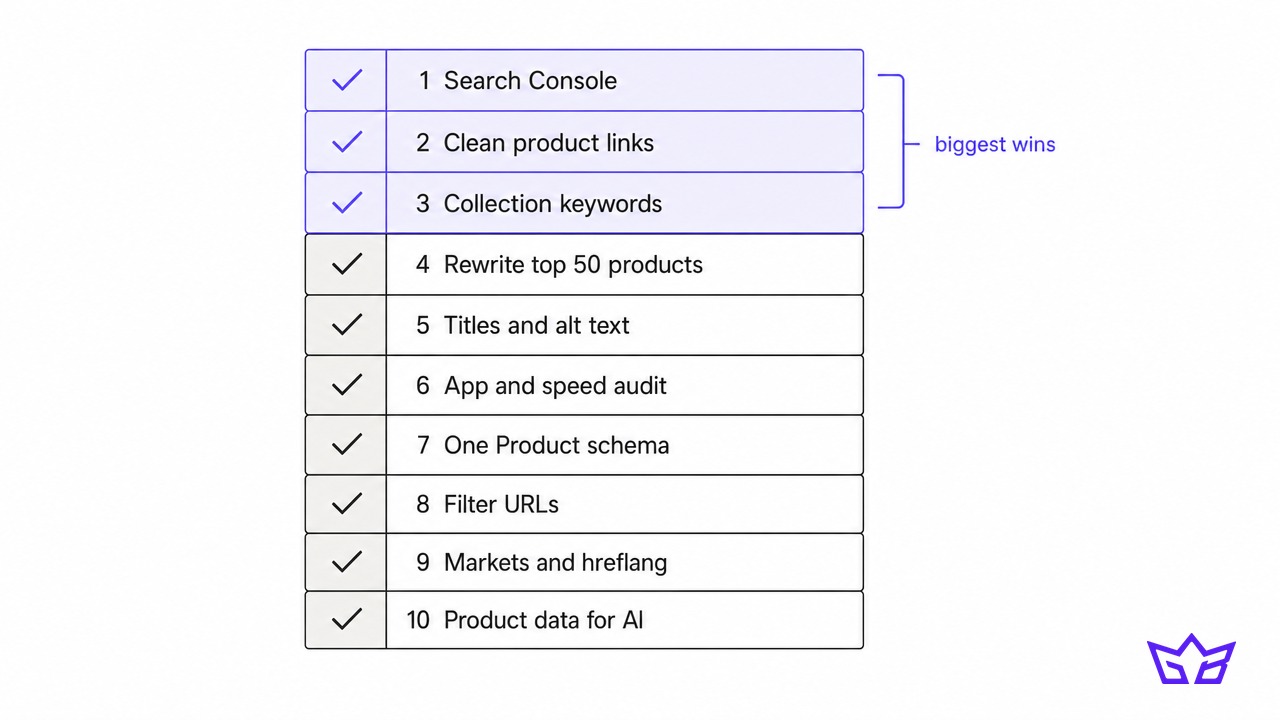
Work through this in order. The top items have the biggest payoff for the least effort.
- Connect Google Search Console and submit your sitemap.xml.
- Fix product links in your theme so they use clean /products/ URLs.
- Map one keyword to each top collection and write titles, headings and intros for them.
- Rewrite copy for your top 50 products, starting with any that use supplier descriptions.
- Fill in every search engine listing for products and collections, and add alt text to images.
- Audit your apps and strip leftover code, then retest Core Web Vitals on mobile.
- Check structured data for one clean Product entity per page.
- Review filter and tag URLs and turn high-demand filters into real collections.
- Confirm Markets and hreflang if you sell outside Canada.
- Complete your product data for Google Merchant Center and AI channels.
What Shopify SEO Services Should Include (and How to Choose an Agency)
If you hire help, the deliverables should map to the checklist above, not to a vague monthly "SEO package." Good Shopify SEO services include:
- Keyword mapping to collections and products, not just blog topics.
- Theme-level technical fixes, including product link paths, duplicate schema and app cleanup. If the agency cannot edit Liquid, it cannot fix half the issues on this list.
- Rewritten collection and product copy, prioritised by revenue.
- Product data work for Merchant Center and AI shopping channels.
- Reporting on rankings and revenue, not just traffic.
When you are choosing a Shopify SEO agency, ask to see a store they have improved, ask what they would fix first on yours, and be wary of anyone who leads with blog volume or promises page one for "shopify seo" itself. Our own Shopify SEO services start with the SEO Kick Starter at $999 a month, which covers keyword strategy, on-page work, technical fixes and monthly reporting.
Your Next Step
Pick your highest-revenue collection and search its category term on Google right now. If a competitor's collection page ranks and yours does not, you have found your starting point. For a full picture of speed, technical issues and on-page gaps, run your store through our free website audit, then get in touch and we will walk you through what to fix first.
Frequently asked questions
Does Shopify have built-in SEO?
Yes. Every Shopify store gets an automatic sitemap.xml, a default robots.txt, canonical tags, SSL and editable titles, meta descriptions and URL handles. What Shopify does not provide is keyword research, content strategy or cleanup of app bloat, which is where most ranking gains come from.
Can you do SEO on Shopify?
Absolutely. Shopify's fixed URL prefixes limit some customisation, but everything that drives rankings is editable: titles, descriptions, handles, collection copy, alt text, structured data and theme code.
Does changing your Shopify theme affect SEO?
It can. Your URLs stay the same because Shopify controls them, but a new theme can change your headings, how collection text displays, structured data output, page speed and whether product links use collection paths. Before switching, record your top pages' rankings and check the new theme's schema and speed on a preview.
How do you choose a Shopify SEO agency?
Look for an agency that works in theme code, maps keywords to collection pages and reports on revenue, not just traffic. Ask what they would fix first on your store and how they prioritise. Be cautious with anyone guaranteeing rankings or leading with blog volume.
How long does Shopify SEO take?
On an established store, we typically see collection and product page improvements start showing in three to six months. New domains and highly competitive categories take longer. Technical fixes like cleaning up duplicate URLs can show up in Search Console within weeks.
Reviewed by Gabriel Narsaik under our editorial policy.