What Is a UTM Parameter? A Plain-English Guide (+ Free Builder)
A UTM parameter is a short tag added to a link so your analytics can tell exactly where a click came from, which campaign, source, and channel sent it. Here is what UTMs mean and how to build them.
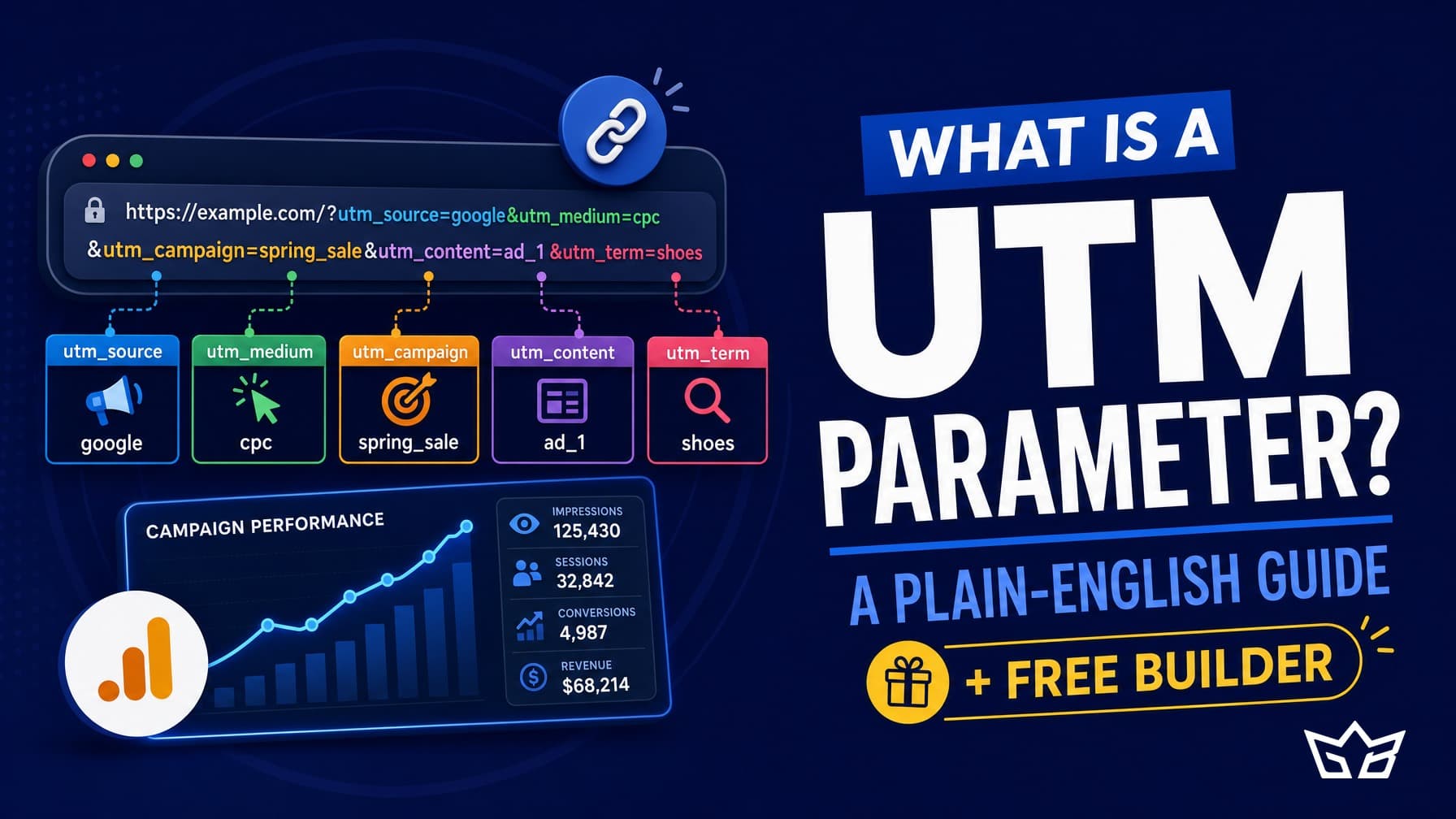
A UTM parameter is a short tag you add to the end of a link so your analytics can tell exactly where a click came from. The UTM meaning is simple: it stands for Urchin Tracking Module (a leftover name from the tool that became Google Analytics), and in plain terms a UTM is a label that travels with your URL and tells GA4 which campaign, source, and channel sent the visitor.
If you have ever wondered why your analytics lump half your traffic into direct or referral and you cannot tell which email, ad, or post actually worked, UTMs are the fix. Below we define UTM properly, walk through the five UTM parameters, and point you to a free UTM Builder so you can tag links without guessing.
What is a UTM parameter?
To define UTM in one line: it is a piece of text appended to a URL, after a question mark, that describes where the link lives and why. A tagged link looks like this: yoursite.ca/offer?utm_source=newsletter&utm_medium=email&utm_campaign=spring_sale. Everything after the question mark is the UTM. It changes nothing about the page a visitor lands on. It only feeds extra information to your analytics so traffic gets sorted correctly instead of falling into a vague bucket.
People say UTMs, UTM codes, or UTM tags, and they all mean the same thing. You add them by hand or with a builder, then use that full link everywhere you promote something: emails, social posts, paid ads, QR codes, partner links.
The five UTM parameters explained
There are five UTM parameters. Three are required if you want clean reporting, and two are optional.
- utm_source (required): the specific place the traffic came from, like Google, facebook, or newsletter.
- utm_medium (required): the channel type, like email, cpc, social, or referral.
- utm_campaign (required): the promotion or reason, like spring_sale or free_audit.
- utm_term (optional): mostly for paid search, to record the keyword you bid on.
- utm_content (optional): to split two versions of the same campaign, like which button or which image, useful for A/B tests.
So utm_source is the who, utm_medium is the how, and utm_campaign is the why. Get those three right and your reports make sense.
Why UTMs matter for attribution
Attribution is the question every marketer needs to answer: which effort actually drove the sale or the lead. Without UTM tracking, analytics has to guess, and it guesses badly. A click from your email app or a messaging app often shows up as direct traffic, so a campaign that worked looks like it did nothing.
UTMs remove the guessing. When you tag a link, GA4 reads the tags and files the visit under the exact source, medium, and campaign you set. Now you can see that the newsletter drove 40 leads and the paid ad drove 6, and you can put money where it earns. For any business spending on ads or content, that clarity is the difference between scaling what works and burning budget on what does not. This is core to how we approach marketing and growth work for clients.
How to build a UTM the right way
Building a UTM by hand is easy to get wrong, which is why a builder helps. The rules are short:
- Start with the clean page URL, then add your tags after a question mark.
- Always fill in source, medium, and campaign at a minimum.
- Use lowercase for everything, always, to avoid split reporting.
- Use underscores or hyphens instead of spaces (spring_sale, not spring sale).
- Keep a naming sheet so email is always email, never e-mail or Email.
The fastest way to do this without mistakes is our free UTM Builder. You paste your URL, fill the fields, and it gives you a ready-to-use link with the tags formatted correctly.
Common UTM mistakes
Most UTM problems trace back to a handful of habits.
Inconsistent naming
Using Facebook, facebook, and FB for the same source splits one channel into three rows in GA4. Pick one spelling and stick to it.
Tagging internal links
Never put UTMs on links between pages of your own site. Doing so restarts the session and erases the real source. UTMs are for inbound links only.
Overstuffing the campaign field
Cramming five ideas into utm_campaign makes reports unreadable. Keep source, medium, and campaign focused, and push extra detail into utm_content or utm_term.
UTMs and GA4
In GA4, your UTMs feed the Traffic acquisition and Sessions reports. utm_source maps to Session source, utm_medium to Session medium, and utm_campaign to Session campaign. You will often see them combined as source / medium, like newsletter / email.
One thing to know: UTMs are case sensitive in GA4. Google / cpc and Google / cpc are treated as two different sources, which is exactly why the lowercase rule matters. If your paid and email data looks scattered across near-duplicate rows, mismatched capitalization is usually the cause.
Keeping your tracking clean over time
UTM tracking is not a one-time setup you finish and forget. It is ongoing housekeeping. Every new campaign, every new team member, and every new tool is a chance for a stray capital letter or a made-up medium to creep in and mess up your reports. The data only stays trustworthy if someone maintains the naming rules month after month.
Treat it like brushing your teeth, not like building a shed. Keep a shared naming document, review your GA4 acquisition report monthly for duplicate or junk sources, and correct habits early. Stop maintaining it and within a quarter your reports drift back into the same fog you started with. The work is small but it never fully ends.
The GTA angle
For small and mid-market businesses across Toronto and the GTA, marketing budgets in CAD are tight and every dollar has to be accountable. Clean UTMs are the cheapest way to prove which local campaign, referral partner, or ad actually brought in business, so you are not defending spend on a hunch.
Start by tagging your next campaign link with the free UTM Builder. If you want help turning that clean data into decisions that grow revenue, get in touch and we will walk through your setup.
Frequently asked questions
What is a UTM parameter?
A UTM parameter is a short tag added to the end of a URL that tells your analytics where a click came from. It changes nothing about the page a visitor sees. It only feeds extra data to GA4 so traffic gets sorted by campaign, source, and channel instead of landing in a vague direct bucket.
What are the five UTM parameters?
The five UTM parameters are utm_source, utm_medium, utm_campaign, utm_term, and utm_content. Source, medium, and campaign are required for clean reporting. Term and content are optional and used mainly for paid keywords and A/B test variations.
What does utm_source mean?
utm_source names the specific place your traffic came from, like Google, facebook, or newsletter. It answers the who behind a click. Pair it with utm_medium (the channel type, like email or cpc) so GA4 shows a clear source / medium pairing such as newsletter / email.
Are UTM parameters a one-time setup or ongoing?
They are ongoing. Setting up a tagged link takes a minute, but keeping your reports clean is day-to-day housekeeping. Every new campaign, tool, or team member can introduce a stray capital letter or a made-up medium. Review your GA4 acquisition report monthly and correct naming habits early, or the data drifts within a quarter.
Do UTM tags hurt SEO?
No, UTM tags do not hurt SEO when used correctly on inbound links from emails, ads, and social. Just never add UTMs to links between pages of your own site, since that resets the session and erases the real source. Keep UTMs for external links pointing to your site only.
Reviewed by Gabriel Narsaik under our editorial policy.