The ChatGPT Business Profile Checklist: 7 Things to Fix Before You Chase AI Traffic
Forty-five percent of consumers now use ChatGPT or another AI tool to find local businesses, but AI platforms recommend only a sliver of listings compared with Google. Here are seven concrete, checkable fixes, from robots.txt to review volume, before you spend a dollar chasing AI traffic.
Forty-five percent of consumers have used ChatGPT or another generative AI tool to find a local business in the past year, up from just 6% the year before, according to BrightLocal's 2026 Local Consumer Review Survey. That's one of the fastest behavior shifts local search has ever tracked.
Here's the part that should worry you more. Showing up there is rare. SOCi's 2026 Local Visibility Index found ChatGPT recommends just 1.2% of local business listings, and Perplexity recommends 7.4%, compared with 35.9% visibility in Google's local 3-pack. Your customers have already moved. Most business profiles have not caught up.
Before you spend a dollar chasing "AI SEO," it helps to know that ranking well on Google will not fix this by itself. Across ChatGPT, Gemini, and Copilot, Ahrefs found that only about 12% of the URLs these tools cite also rank in Google's top 10 for that same query. AI platforms piece together a messier picture of your business than Google does, from your website, your listings, your reviews, and whatever else they can find. If any part of that picture is blocked, missing, or inconsistent, you get skipped, no matter how well you rank.
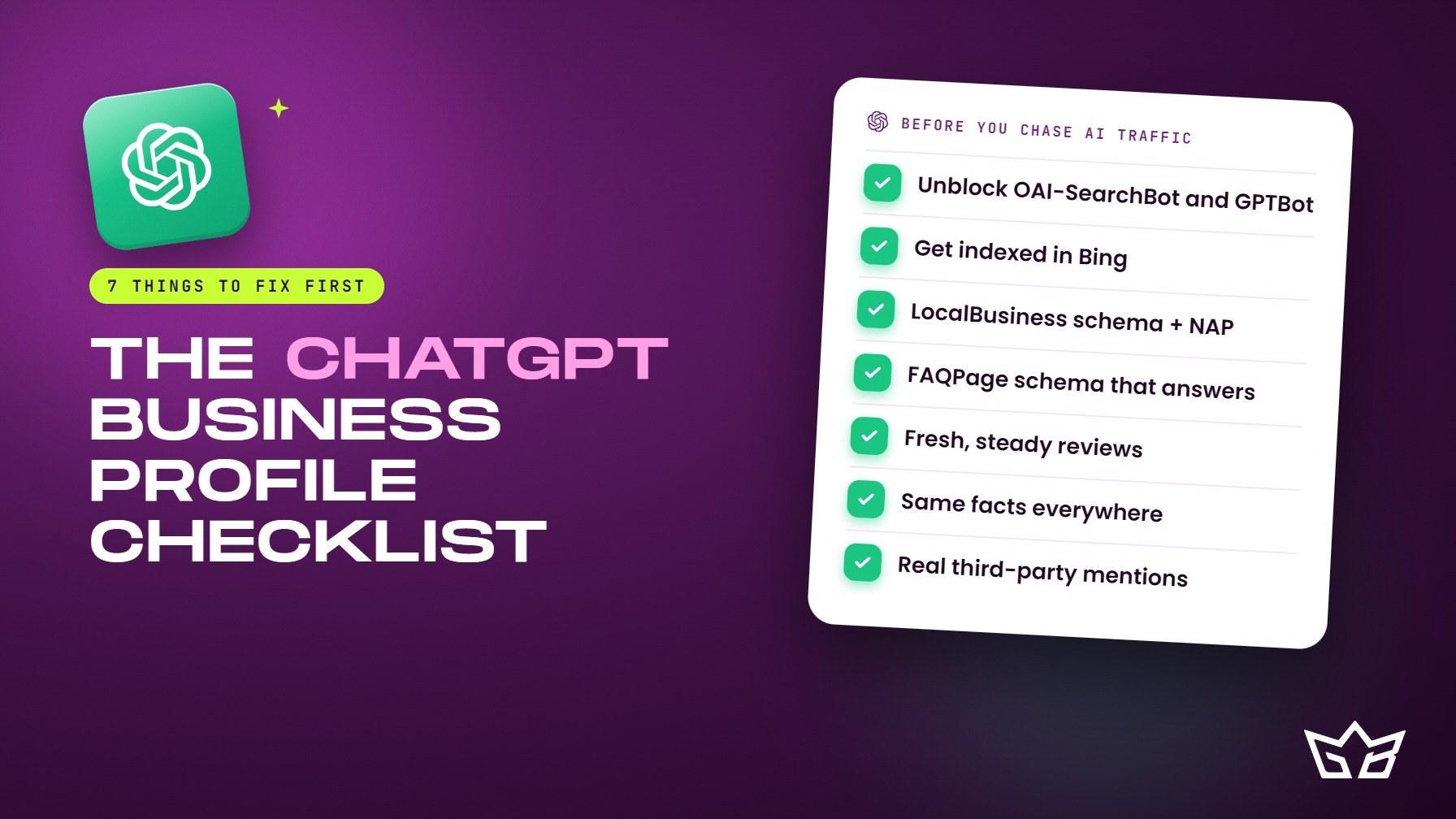
This isn't a content strategy. It's a maintenance checklist: seven specific things to check this week, each one either true or false about your business right now. We've covered how AEO, GEO, and LLMO actually work elsewhere in detail; this post stays narrow and practical. If you would rather hand the whole thing off, that is what our AI search optimization work covers.
1. Confirm OAI-SearchBot and GPTBot aren't blocked in robots.txt
Open yoursite.com/robots.txt and check for a disallow rule against OAI-SearchBot or GPTBot. They do different jobs, and plenty of sites block one or both by accident.
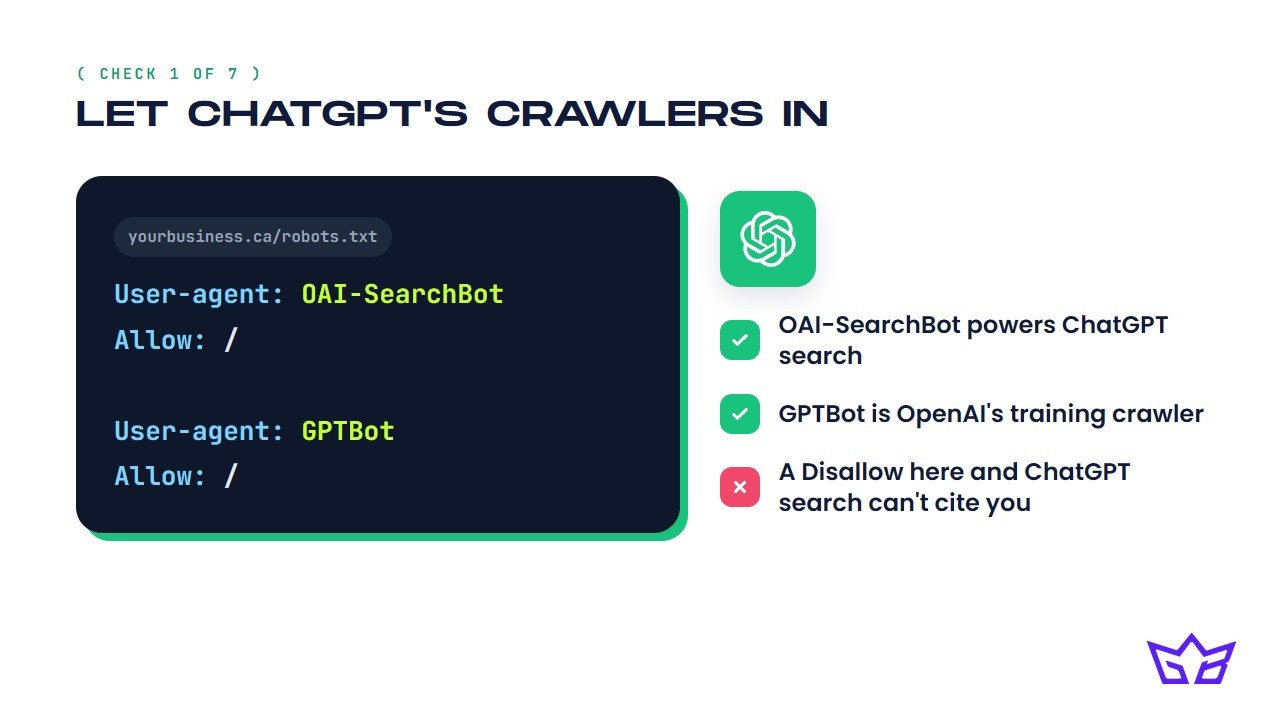
- GPTBot is OpenAI's training crawler. Disallowing it just means your content won't be used to train future models, a reasonable choice on its own.
- OAI-SearchBot is the separate crawler behind ChatGPT's live web search. OpenAI's own documentation is direct about this: sites that opt out of OAI-SearchBot will not be shown in ChatGPT's search answers at all.
This mix-up is common: a security plugin or CDN often has a blanket "block AI bots" toggle that gets switched on without anyone reading what it blocks. To check it, visit your site's robots.txt directly in a browser and search for both bot names. If you see "User-agent: OAI-SearchBot" followed by "Disallow: /", that line is blocking you from ChatGPT's answers outright. Fix it by scoping the rule to GPTBot only, or removing it entirely, then give it a day: OpenAI notes robots.txt changes can take about 24 hours to take effect for search.
2. Confirm your site is actually indexed in Bing
Search site:yoursite.com directly on Bing.com. If nothing comes back, there's a real chance ChatGPT can't find you either, since ChatGPT Search is built heavily on Bing's index, not Google's, for a meaningful share of its live web results. As that same breakdown of the feature puts it, if your site isn't in Bing's index, it won't appear in ChatGPT's results.
Most small businesses have only ever set up Google Search Console, since Google has owned the search conversation for years, so a site never manually submitted to Bing can sit invisible to it indefinitely.
To check it, run the site: search above, then set up a free Bing Webmaster Tools account (it can import verification straight from Google Search Console), submit your sitemap, and compare the indexed count against what Google reports. A large gap is your answer; most sites see Bing indexing catch up within days to a few weeks once they submit.
These first two items, crawler access and Bing indexing, are the most common reason a business is invisible to ChatGPT altogether. Everything else on this list is wasted effort until both check out.
3. Add Organization or LocalBusiness schema with accurate NAP
Add Organization structured data to your homepage and LocalBusiness structured data to each location page, with your exact legal name, address, and phone number matching your Google Business Profile exactly. That small block of code is often the cleanest, least ambiguous version of your business facts anywhere on the web.
This matters more for AI platforms than it ever did for traditional SEO. SOCi's index found business profile information was only about 68% accurate on both ChatGPT and Perplexity, compared with 100% on Gemini, which draws directly on Google Maps data. ChatGPT and Perplexity don't have that same guaranteed-accurate backbone, so they're piecing your business together from whatever text they can crawl. A clean schema block gives them an explicit answer instead of a guess.
To check it, run your homepage and a location page through Google's Rich Results Test and look for Organization or LocalBusiness in the results. Confirm the name, address, and phone number in that markup match your Google Business Profile exactly, not an old address or a shortened version of your business name.
4. Add FAQPage schema where pages actually answer questions
Mark up FAQPage schema only on pages that contain real, visible question-and-answer content, a service page with genuine FAQs or a dedicated FAQ page, not your homepage just because it gets the most traffic.
Google has said directly that it doesn't require special markup to appear in AI Overviews or AI Mode, so don't add FAQPage schema expecting a secret "AI visibility" switch. What it does do is force your content into a tight, self-contained question-and-answer structure that's easy for any crawler, human or AI, to lift and quote. That's useful on its own merits; it just isn't a magic tag. For more on how assistants extract and weigh that kind of structure, see our full AEO, GEO and LLMO guide.
To check it, validate any page carrying FAQPage markup in Google's Rich Results Test, and read the questions out loud. If a question wouldn't naturally come out of a real customer's mouth, or the answer isn't genuinely visible on the page, drop it rather than stuffing keywords into a schema block nobody sees.
5. Check your review volume and recency
Pull your current Google review count and check when your last review came in. A thin or stale review history is one of the clearest signals telling AI platforms to look elsewhere, since review volume functions as a trust signal: a substantial, active base of reviews reads as a real, current business worth recommending, while a thin one reads as a riskier bet.
Recency matters just as much as volume: a page of reviews that all date from three years ago reads as stale, whether a human or a model is weighing it.
To check it, look at your review count and dates on Google, but don't stop there. Check Yelp, Facebook, and any platform specific to your industry too, since AI platforms cross-reference your reputation across more than one source. If your pace of new reviews has gone quiet, put a simple ask in place: a text or email sent within a day or two of finishing a job converts far better than a generic request sent weeks later.
6. Make your business facts consistent everywhere they're listed
Pull up your Google Business Profile, your website, your Facebook page, and your top directory listings side by side, and check that the following say the same thing on every one of them. A conflict between two sources is often resolved by an AI platform simply leaving you out rather than guessing which one is right.
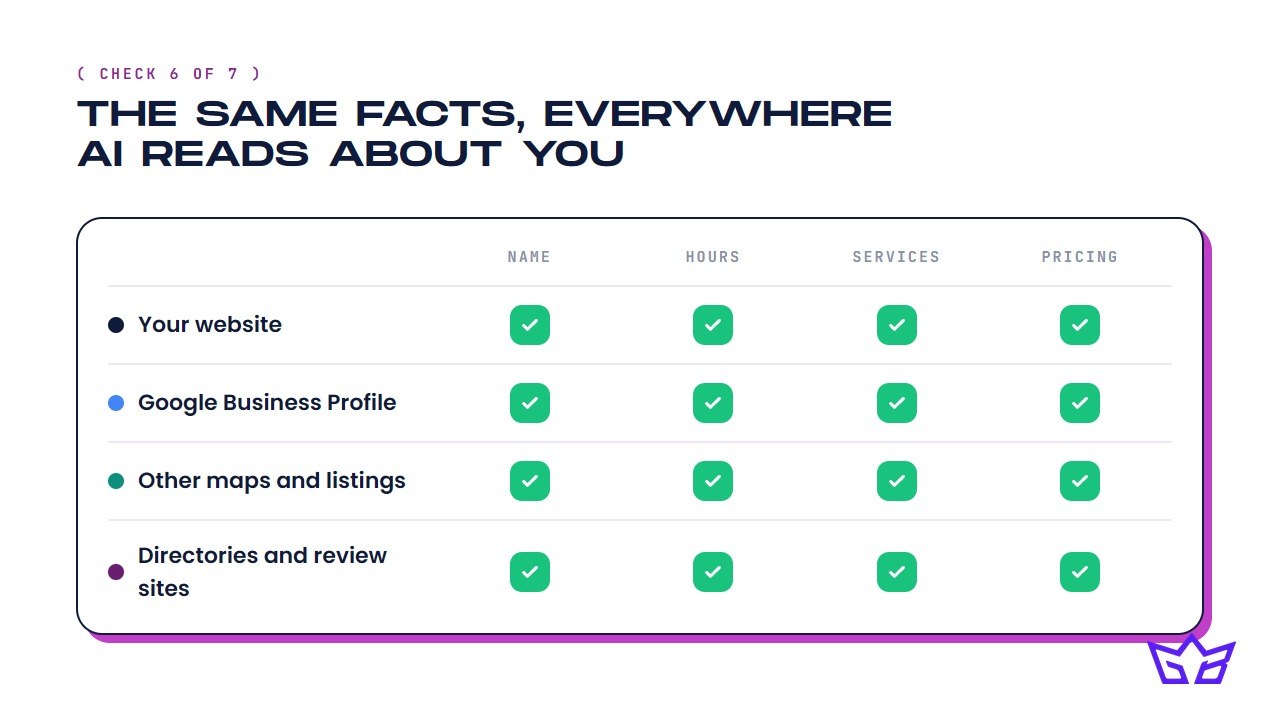
- Operating hours, including holiday and seasonal hours
- The specific services or products you offer
- Starting prices or price ranges, if you list any
- Your business name and phone number, formatted the same way everywhere
Traditional SEO tolerated small inconsistencies because a person could reconcile outdated hours with a quick phone call; an AI assistant assembling a fast answer doesn't have that patience. Faced with two sources that disagree, it tends to favor whichever business has the fewest contradictions, even when a competitor with messier listings would objectively be the better choice. Build one simple source-of-truth document, even a shared spreadsheet works, and check it against every listing once a quarter. Seasonal hours are the single most common place this drifts out of sync.
7. Earn a few real third-party mentions
Get your business named, specifically, on a handful of sites you don't own and can't edit, because AI platforms weigh earned mentions far more heavily than anything you claim about yourself. Ahrefs' study of 75,000 brands found branded web mentions correlated far more strongly with AI Overview visibility (0.664) than backlinks did (0.218), making mentions a stronger signal than classic link-building.
The logic makes sense once you see it: your homepage calling you "Toronto's top-rated electrician" is a brand making a claim about itself, worth nothing as evidence. A local news write-up or chamber of commerce listing saying the same thing is independent corroboration, the kind of signal a model can actually weigh.
To check it, search your business name in quotes and see what comes up beyond your own properties. If the list is thin, a handful of genuine mentions from realistic sources does more than a long list of low-effort directory submissions:
- A local news outlet that covers small businesses in your area
- Your city or regional chamber of commerce
- An industry association or trade directory
- A guest spot on a podcast or blog in your field
- A local event you sponsor in exchange for a direct, named mention
One thing you can skip for now
Skip adding an llms.txt file hoping it helps your ChatGPT visibility; it doesn't. Google has stated directly that it doesn't use llms.txt as a ranking or generative-search signal at all, for ordinary search or for its AI features. Creating one won't hurt you, but it won't move you up any list either, so the time is better spent on the seven items above.
None of this guarantees ChatGPT recommends you next week. What it does is remove the entirely preventable reasons a business gets skipped: blocked crawlers, missing indexing, wrong contact details, thin reviews, and a web presence that contradicts itself. That's foundational maintenance, the same category as making sure your site loads and your phone number is current, not a growth hack.
If you want help running through this properly, that's the kind of audit we do as part of our AI SEO services and local SEO services, and it's the same groundwork behind our SEO work for Toronto businesses and our broader SEO services. Or just get in touch, tell us your situation, and we'll tell you honestly whether any of this is worth paying someone to fix, us included.
Frequently asked questions
Do I need to block GPTBot if I don't want ChatGPT training on my content?
You can block GPTBot alone without losing ChatGPT search visibility. GPTBot and OAI-SearchBot are separate crawlers: GPTBot controls whether OpenAI can use your content to train future models, while OAI-SearchBot controls whether ChatGPT's live search can cite you. Disallowing GPTBot opts you out of training only; disallowing OAI-SearchBot removes you from ChatGPT's search answers entirely, so check which one (if either) your site is actually blocking before you change anything.
Does ranking well on Google guarantee visibility in ChatGPT?
No. Ahrefs found that only about 12% of the URLs cited by ChatGPT, Gemini, and Copilot also rank in Google's top 10 for the same query, so the two systems overlap far less than most businesses assume. Ranking well is still useful groundwork, but it won't fix a blocked crawler, missing Bing indexing, or inconsistent business data on its own.
Do I need an llms.txt file to show up in ChatGPT?
No. Google has stated directly that it doesn't use llms.txt as a ranking or generative-search signal, and creating one neither helps nor hurts your visibility. The seven checks in this post (crawler access, indexing, schema, reviews, and consistent listings) make a far bigger difference.
How long does it take to see results after fixing these seven items?
There's no fixed timeline, since it depends on how many of the seven items were broken to begin with. Crawler and indexing fixes can take effect within days, but AI platforms recompute their recommendations on their own schedule, not yours, so expect gradual movement over the following months rather than an overnight change.
Which matters more for ChatGPT visibility, my website or my Google Business Profile?
Both, but for different reasons. SOCi's 2026 Local Visibility Index found business profile accuracy is only about 68% on ChatGPT and Perplexity, versus 100% on Gemini, which draws directly on Google Maps data. Since ChatGPT and Perplexity don't have that same guaranteed-accurate backbone, your website's own schema and consistent listings carry extra weight in filling the gaps.
If I can only do one of these seven things first, which should it be?
Start with items one and two: confirming OAI-SearchBot and GPTBot aren't blocked in robots.txt, and confirming your site is actually indexed in Bing. Perfect schema and strong reviews don't matter if the crawler can never reach the page or the index never picks it up in the first place.
Reviewed by Gabriel Narsaik under our editorial policy.