llms.txt in 2026: What It Is, Whether It Works, and What Gets You Cited
What llms.txt is, what Google and 2026 log data say about whether it works, how to make one in 30 minutes, and what really gets you cited by AI.
Every few weeks, a business owner forwards us the same tip: "Add an llms.txt file so ChatGPT starts recommending you." The file is real, it's free, and we publish one ourselves. But the evidence on whether llms.txt gets you cited is far less exciting than the LinkedIn posts promise, and that gap is where a lot of AI marketing budget quietly disappears.
Here's the honest version: what the file is, what Google and the log data say, how to set one up in 30 minutes, and the work that actually moves ChatGPT, Gemini and Perplexity recommendations.
What is llms.txt?
llms.txt (sometimes searched as llm.txt) is a plain text file, written in Markdown, that sits at the root of your website and gives AI tools a short, curated map of your most important pages. Jeremy Howard, co-founder of Answer.AI, proposed it on September 3, 2024, and the spec lives at llmstxt.org.
The logic is sound. A web page is cluttered with menus, scripts and cookie banners, and a language model reading it on the fly has limited room to work with. The proposal says its authors expected the file "would mainly be useful for inference rather than training": the moment an AI tool looks something up for a user, not when a model is built.
What goes inside an llms.txt file
The format is light. In plain words, the file has:
- A title line with your business or project name. This is the only required part.
- A short summary set off as a quote block: who you are and the context a reader needs for everything below.
- Optional notes in normal paragraphs or bullets.
- Sections of links under headings like Services or Guides, each link followed by a colon and a one-line description.
- An "Optional" section for secondary links an AI tool can skip when it's short on space.
No special tags, no code, nothing a developer has to install.
How it differs from robots.txt
People lump llms.txt in with two files your site probably already has. They do very different jobs:
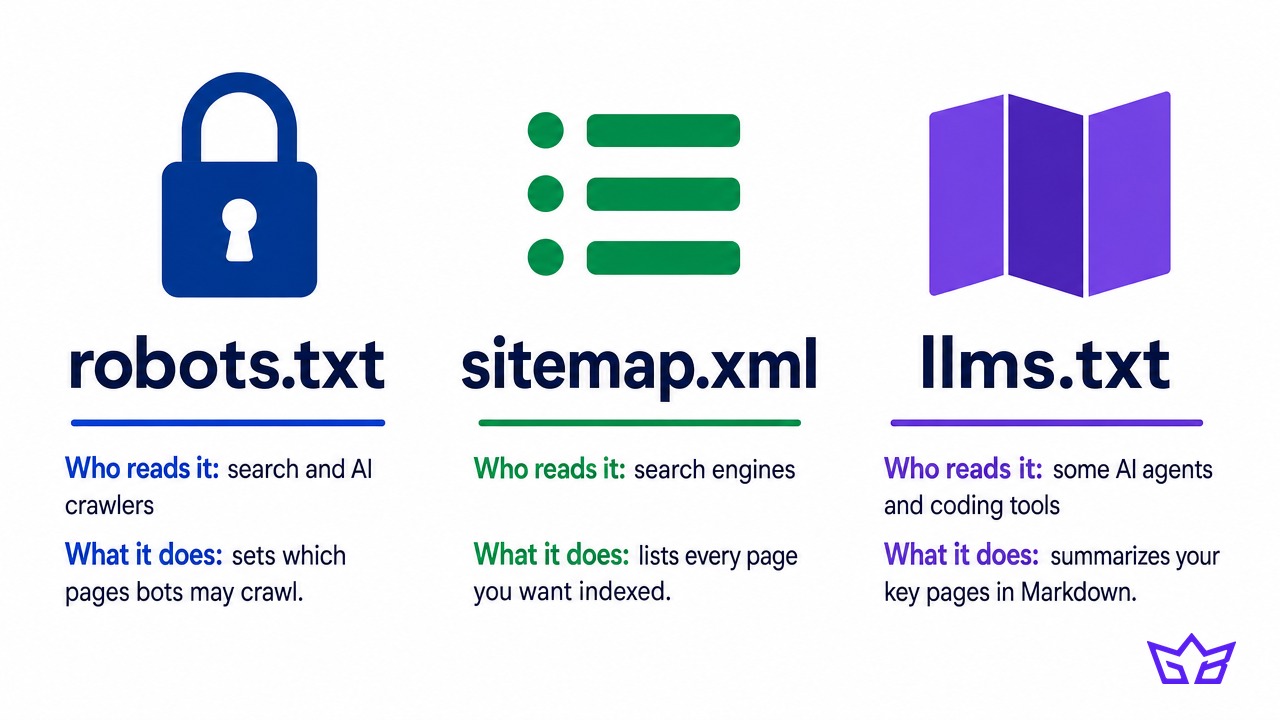
- robots.txt is the rulebook. It tells crawlers like Googlebot, OAI-SearchBot and PerplexityBot what they may and may not crawl. Get it wrong and you can vanish from search and AI answers entirely.
- sitemap.xml is the full inventory. It lists every URL you want indexed so search engines don't miss pages. It has no descriptions and can run to thousands of entries.
- llms.txt is the curated brochure. It lists only your key pages, with a sentence on each, in a format a language model reads easily. No bot is required to read it, and it doesn't block or unblock anything.
robots.txt controls access, sitemap.xml helps discovery, and llms.txt only offers a summary. If your robots.txt blocks an AI crawler, no summary file will rescue you.
Does llms.txt work?
For getting cited in Google or ChatGPT answers, the evidence says no, or at best not yet. For helping AI agents and coding tools read a site, there's a real but narrow use.
What Google says
Google has been unusually direct. Its guide to optimizing for generative AI features says: "You don't need to create new machine readable files, AI text files, markup, or Markdown to appear in Google Search (including its generative AI capabilities), as Google Search itself doesn't use them." The same section adds that it's "completely fine" to maintain llms.txt files "for other services or systems that use these files."
In April 2025, as reported by Search Engine Journal, Google's John Mueller compared it to the old keywords meta tag, a self-declared summary search engines learned to ignore: "AFAIK none of the AI services have said they're using LLMs.TXT."
Then Chrome muddied the water. In May 2026, Google's Lighthouse auditing tool gained an Agentic browsing category that includes an llms.txt check. Read the fine print, though:
- A missing file isn't a failure. Chrome's documentation marks it Not Applicable, "as providing the file is optional at the moment."
- It mostly checks the file loads. The audit flags a server error when fetching it.
- It's off by default. Chrome's DevTools 150 release notes describe the Agentic Browsing checkbox as "disabled by default."
That's a browser team preparing for AI agents, not Google Search rewarding anyone.
What the log data shows
Two large studies went looking for an effect and came back empty.
- SE Ranking checked nearly 300,000 domains and found llms.txt on 10.13% of them. Its citation study found no correlation between having the file and AI citations, and its prediction model got more accurate once that variable was removed. Busy sites were actually less likely to have one: 8.27% of high-traffic domains, against 9.88% of low-traffic ones.
- Ahrefs analyzed traffic to these files on 137,210 domains in May 2026. About 28% published a file, and 97% of those files received zero requests that month. Among the files that did get traffic, AI retrieval bots, the ones that fetch pages to answer a live question, made just 1.1% of requests. SEO audit tools made 21.7%.
Ahrefs' verdict: "The closest thing to an intended audience in our data is coding agents."
If a vendor says llms.txt will get you into ChatGPT, ask for server logs showing ChatGPT reading it. We have not seen any.
Where it does earn its keep
The file was born for software documentation, and that's where it works. In the Ahrefs data, Claude Code, Anthropic's coding assistant, fetched these files more than every AI retrieval bot, assistant and training crawler except GPTBot and one indexing bot. OpenAI, Anthropic and Perplexity all publish one for their own developer docs, so coding tools can pull a clean, current index.
The second use is AI agents that browse on someone's behalf. Chrome's documentation puts it plainly: "Without this file, agents may spend more time crawling the site to understand its high-level structure and primary content." If agents start booking appointments for your buyers, a tidy site map could matter. Today, for a plumber in Burlington or a clinic in Mississauga, it's a small bet with a small payoff.
What's in our llms.txt
We run our own llms.txt file, generated by our site. It's about 21 KB, organized like this:
- A summary and Key Facts: our legal name, that we're based in Oakville and serve Toronto, the GTA and the US, and our track record.
- Services: our 13 service pages, each with a one-line description.
- Proof and places: 4 case studies and 9 location pages.
- Key pages: packages, about, contact, financing and our editorial policy.
- People and content: our 4 authors and roughly 100 blog posts.
Two lessons from running it. First, a file nobody updates goes stale. At one point ours listed 32 articles while the site had 68 live, because it read from a different source than the blog. Now it's built from the same published content as our sitemap, so new pages appear on their own.
Second, put the facts AI tends to garble in it: where you are, who you serve, what each service is and where your prices live. If an agent does read it, it gets the right answer.
Our take: it took about an hour, costs nothing to host, and we'd do it again. We just don't count it as a reason anyone cites us, and we'd never sell it to a client as one.
How to create an llms.txt file
Budget 30 minutes. This is the order we use:
- Check whether you already have one. Type yoursite.com/llms.txt into a browser; some SEO plugins create one quietly.
- Pick 10 to 30 pages. Home, each service, pricing, about, contact, your best case studies and your most useful guides. Skip thank-you pages, tag archives, cart and login pages, and anything set to noindex.
- Write the summary first. One or two sentences on who you are, where you are and who you serve. "A licensed plumbing company in Burlington, Ontario, serving Halton homeowners and property managers" beats any slogan.
- Describe each link in one line, with facts instead of adjectives: service area, what's included, who it's for.
- Publish it at your site root, so it loads at yoursite.com/llms.txt, not inside a subfolder.
- Open it in a browser and click every link. Then set a quarterly review reminder, or have it generated automatically.
WordPress, Squarespace and Shopify
- WordPress with Yoast SEO: the feature is built into the free plugin. Switch it on in Yoast's Site features settings, then let it pick key pages automatically or choose them yourself.
- WordPress with Rank Math: turn on the LLMS Txt module from the Rank Math dashboard, then choose which post types to include under General Settings. Pages set to noindex are left out.
- Squarespace: version 7.1 sites can publish one from the SEO/AI Visibility panel, under SEO Settings, on the LLMS.txt tab. You write the text yourself, and older 7.0 sites don't have the option.
- Shopify: Yoast SEO for Shopify added the same toggle in March 2026.
Treat a generator as a first draft
A free llms.txt generator will crawl your site and produce a file in seconds. Treat that as a starting point: delete pages that don't belong and rewrite descriptions pulled from old meta tags. Ten minutes of editing turns a generic dump into a real summary of your business.
What actually gets you cited
Here's the uncomfortable truth: the file is the easiest item on the AI visibility list, which is exactly why it gets so much airtime. The work that moves recommendations is harder, and most of it happens off your website.
Let the right crawlers in
OpenAI's crawler documentation is blunt: "Sites that are opted out of OAI-SearchBot will not be shown in ChatGPT search answers." Perplexity says that to appear in its results, you should allow PerplexityBot in robots.txt. Check your robots.txt, then ask your host whether a firewall or bot-protection setting is quietly turning AI crawlers away. Our 10-minute ChatGPT visibility diagnostic walks through each check.
Get talked about elsewhere
AI assistants lean heavily on what other sites say about you: directories, local news, industry lists and forum threads. One genuine mention in a Hamilton Spectator story or your trade association's directory does more than any file on your own server.
Keep reviews fresh
A steady flow of recent reviews on Google and your industry's platforms tells AI tools you're active and trusted. Our breakdown of the local business AI visibility gap shows why local companies get skipped and how reviews factor in.
Write answer-first pages with consistent facts
Put the answer in the first sentence under a question heading: price ranges, service areas, timelines. Keep your name, address, phone and hours identical everywhere, from your site to your Google Business Profile, and back them with LocalBusiness schema. Our AEO, GEO and LLMO guide covers this playbook in depth.
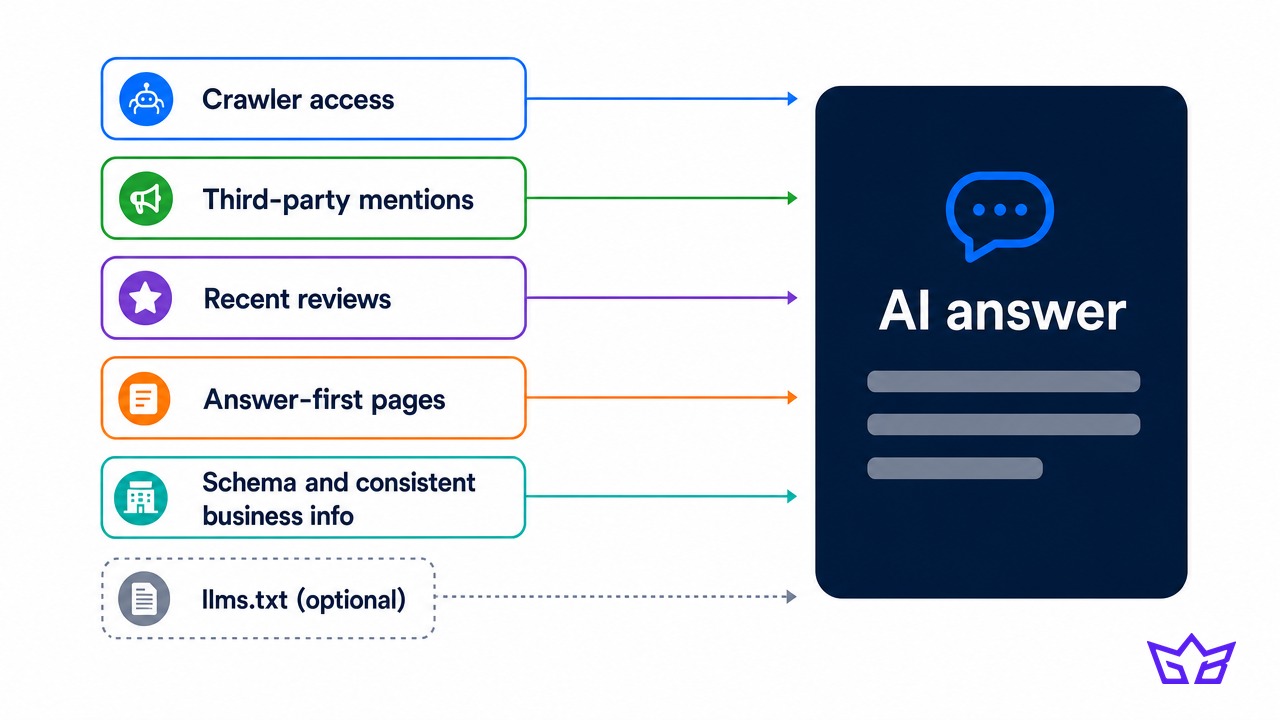
This is the work llms.txt can't do. If you've added the file and still don't show up when you ask ChatGPT for the best company in your trade and city, the file was never the problem. Our AI SEO agency team starts with a free AI visibility audit: we run your top buyer questions through ChatGPT, Gemini and Perplexity and show you who gets named instead of you.
Your next step
Spend 30 minutes this week: check yoursite.com/llms.txt, publish or fix the file with 10 to 30 key pages, and confirm your robots.txt lets OAI-SearchBot, PerplexityBot and Googlebot in. Then ask ChatGPT and Perplexity the three questions your buyers ask before they hire someone like you, and write down who gets named.
If it isn't you, the gap is mentions, reviews and answer-first pages, not a text file. Get a free audit and our team will show you exactly where AI looks, who it picks instead of you, and what to fix first.
Frequently asked questions
What is an llms.txt file?
It's a Markdown text file at the root of a website that gives AI tools a short summary of the business and links to its most important pages. Jeremy Howard of Answer.AI proposed the format in September 2024. It's a voluntary convention, and no AI company is obliged to read it.
Will llms.txt help your SEO?
Not for Google. Google's guide to generative AI features says Google Search, including its AI features, doesn't use llms.txt or other AI text files. An SE Ranking study of nearly 300,000 domains also found no correlation between having the file and AI citations.
Does ChatGPT use llms.txt?
OpenAI has not said that ChatGPT uses llms.txt to choose which sites it cites. What OpenAI does document is that sites blocking OAI-SearchBot won't be shown in ChatGPT search answers. Ahrefs' May 2026 data found AI retrieval bots made just 1.1% of requests to the files that got any traffic.
Where do you put an llms.txt file?
Put it at the root of your domain so it loads at yoursite.com/llms.txt, the same place robots.txt lives. On WordPress, Yoast SEO and Rank Math can create and serve it for you. On Squarespace 7.1, paste your text into the LLMS.txt tab under SEO Settings.
How do you see the llms.txt file of a website?
Type the domain followed by /llms.txt into your browser, for example growthboss.co/llms.txt. If the site has one, it loads as plain text. If you get a "page not found" error, the site doesn't publish one.
Reviewed by Gabriel Narsaik under our editorial policy.