Meta One for Business: Is Meta's New Subscription Worth It?
Meta One subscription for business, tier by tier: what Essential, Advanced, Expert and Max unlock, what is already free, and which one to buy.
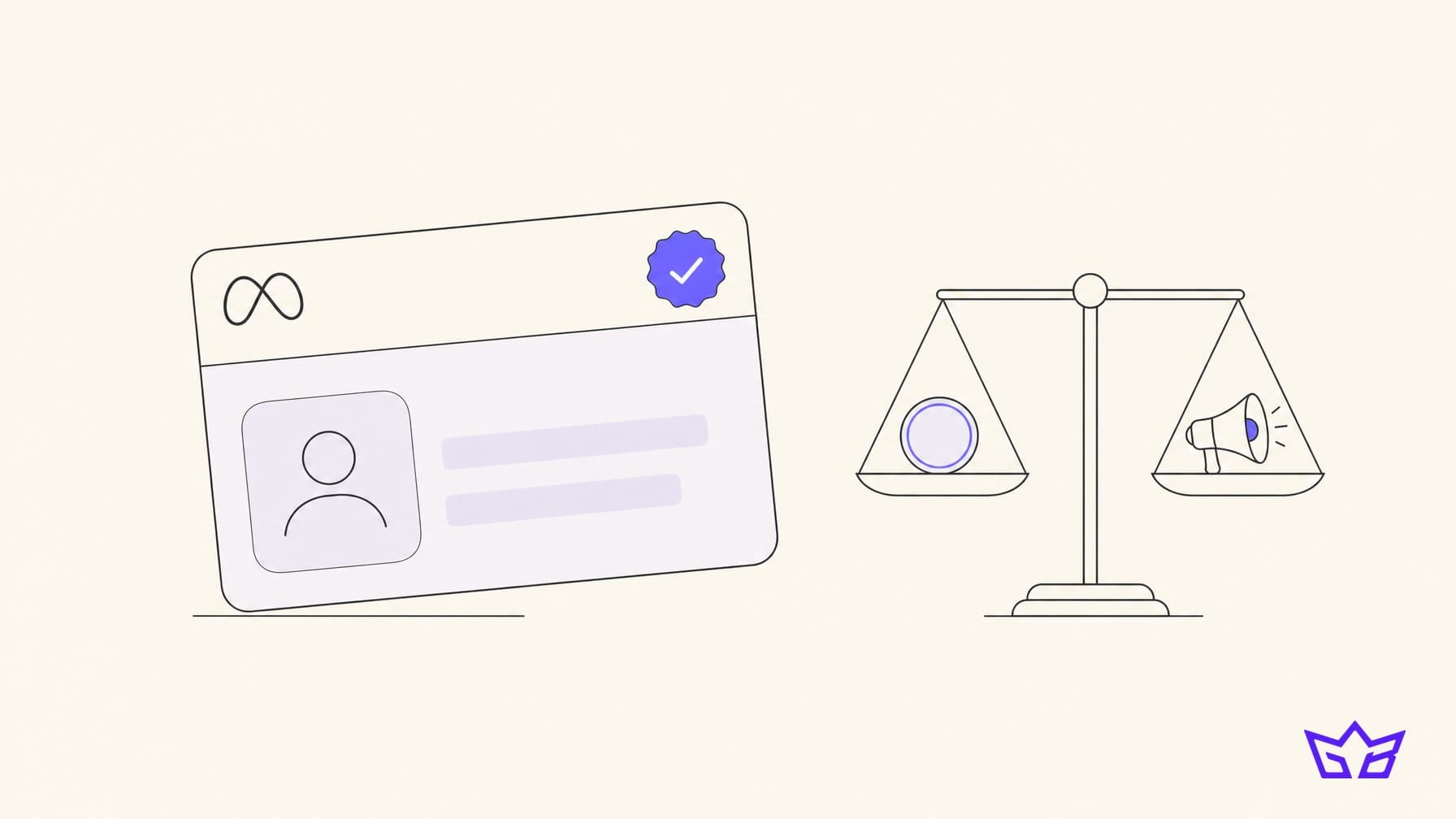
Meta now sells your business a monthly plan, and the top tier costs US$499 a month per Page. The Meta One subscription launched on September 15, 2026 with four business tiers, and the first thing Canadian owners ask us about it is whether paying Meta makes their ads work better. It does not, and once you understand why, deciding which tier (if any) to buy gets much simpler.
Here is what each tier actually unlocks, what you already get for free, the fine print on Canadian availability, and a decision rule you can apply in five minutes.
What Meta One Is, and What It Is Not
Meta One is a paid subscription that sits across Facebook, Instagram, WhatsApp and Meta AI. According to Meta's launch announcement, it comes in three families: personal plans (Core at US$7.99 and Premium at US$19.99 a month, plus single-app plans from US$2.99), creator plans, and the business plans this post covers. Meta says the core experience of its apps stays free.
Two details matter more than the headline prices.
- It absorbs Meta Verified. Meta's own FAQ says it is "bringing the best of Meta Verified into Meta One." Every business tier includes the verified badge, pending verification. If you already pay for Meta Verified, Meta says nothing changes for you right now and it will notify subscribers when they can switch.
- It is priced per account. The Meta One plans page lists every business price "per Facebook Page, Instagram profile or WhatsApp Business number." Before you assume one subscription covers your whole brand, check what the checkout flow shows for your accounts.
What Meta One is not: an advertising product. Nothing on the business plan list touches Ads Manager, bidding, targeting, the auction or your cost per result. It is a toolkit for your organic presence, your WhatsApp inbox and your reporting.
Meta One Subscription Tiers, Plan by Plan
All four prices below are Meta's published US dollar rates. Meta says plans, benefits and availability vary by region and account, and that the specific features for your account only show once you start subscribing.
Essential: US$14.99 a month
This is the credibility tier. You get the verified badge and impersonation protection, a link page on Instagram, and on WhatsApp Business a custom web URL, one verified channel and "more access" to Meta Business Agent, the AI that answers customer messages around the clock. It is essentially Meta Verified plus a bigger AI allowance.
Advanced: US$49.99 a month
This is where the tools that actually change your marketing start. Advanced adds:
- Links in organic posts and Reels, capped at four a month on Instagram according to Social Media Today's breakdown
- Competitive insights on Instagram, which Social Media Today reports covers up to 10 competitor brands
- Custom audience insights on Facebook, showing who sees and engages with your content without following you
- Advanced scheduling, including Stories up to 30 days ahead, and exportable analytics
- Shared access for 4 people on Instagram without handing over your password, plus one support case a month
- On WhatsApp: 3 verified channels and 500 business broadcast credits
Expert: US$149 a month
Same toolset, bigger allowances: 8 links a month, an enhanced profile covering 5 locations, shared access for 8 people, 5 support cases a month, 5 WhatsApp verified channels, 1,250 broadcast credits and 10 protected business accounts.
Max: US$499 a month
The ceiling: 12 links a month, 8 locations, shared access for 30 people, support cases with no monthly limit, 10 WhatsApp verified channels, 5,000 broadcast credits, 50 protected business accounts and Meta's highest Business Agent capacity.
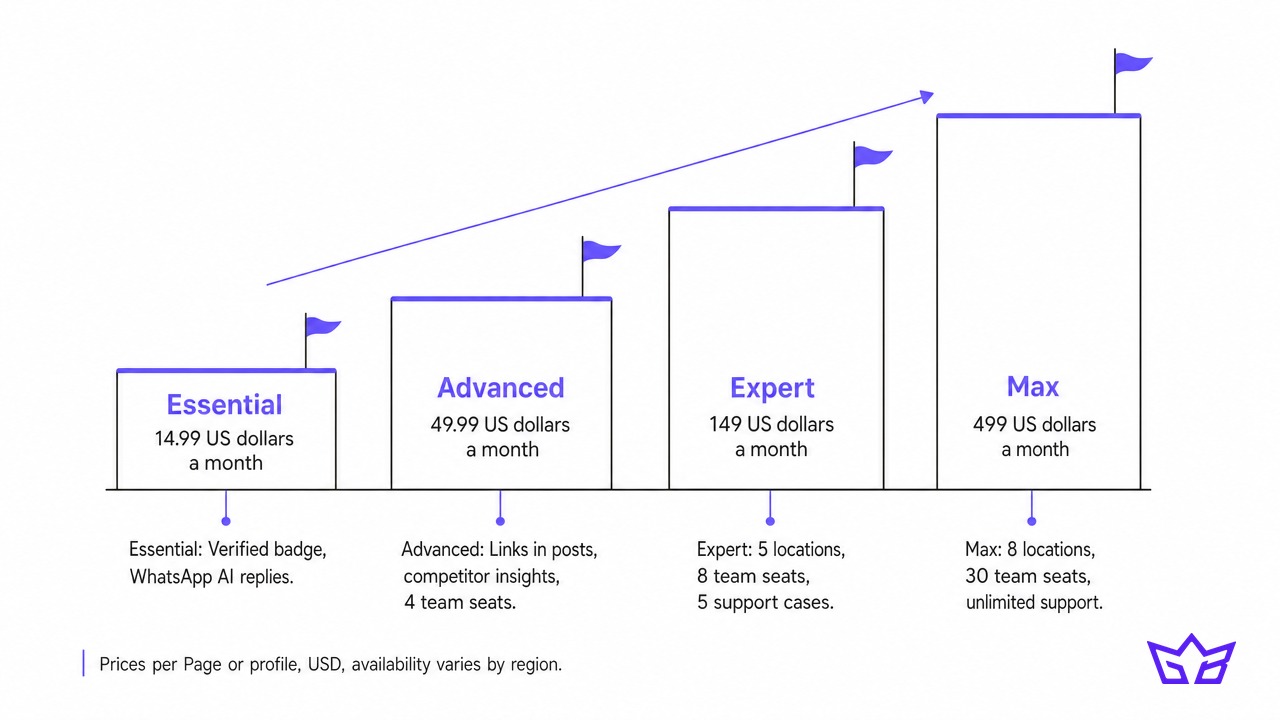 The big jump is between Essential and Advanced. Everything above Advanced is the same features with more seats, locations and credits. For most small businesses, the real choice is between nothing, Essential and Advanced.
Does Meta One Change Anything About Your Ads?
No, and this is the part worth being blunt about. Meta's announcement and plan pages describe publishing, insights, verification, support and WhatsApp features. There is no ad credit, no lower cost per click, no priority in the auction and no Advantage+ upgrade. A business spending $3,000 a month on Meta Ads gets the same delivery whether it pays for Max or pays nothing.
What a subscription can do is sharpen the inputs to your ads. Custom audience insights tell you who engages with your content without following you, which is useful for building audiences and briefing creative. Competitive insights show how rival brands' organic content performs. That is research, and research is only worth paying for if someone acts on it.
Meta AI is the other piece people confuse with Meta One. On August 19, 2026, Meta announced that Meta AI can now connect to your Facebook and Instagram accounts, your Meta ad campaigns and Google Workspace, then analyse performance and turn it into Docs, Sheets and Slides. Meta says the features are free to start, and that businesses wanting more from them will be able to subscribe to Meta One. The AI recommends changes; it does not make them in your account.
If your goal is better ad results, spend the money on creative and testing, not on a subscription. We made the same point about where your Meta budget should go in our look at Meta overtaking Google in ad revenue: creative is now the targeting.
What You Already Get for Free
Before you pay for anything, check how much of the pitch you already have:
- Ads Manager: every campaign, audience and reporting tool you need to run paid ads, at no subscription cost.
- Meta Business Suite: free scheduling for Facebook and Instagram posts, a shared inbox and standard insights.
- Meta Ad Library: see every active ad any competitor is running on Facebook and Instagram, right now, for free. For most local businesses this is more useful competitive research than organic benchmarks.
- Meta AI business analysis: free to start, as above.
- Business portfolio permissions: you can already give staff and agencies role-based access to Pages and ad accounts without sharing a password.
That last one takes some shine off the "shared access" feature. The Instagram seat counts in Meta One are a convenience for teams working inside the Instagram app itself, not the only safe way to share access.
Which Tier Makes Sense for Which Business
Here is how we would call it for the businesses we work with across the GTA.
- Local service business (a contractor, clinic or salon in Oakville or Mississauga): probably nothing. Your leads come from Google, referrals and ads. Consider Essential only if someone is impersonating your Page or WhatsApp is a real sales channel for you.
- WhatsApp-heavy business (bakeries, caterers, businesses serving communities that live on WhatsApp): Essential is the cheapest way to get more AI-answered messages and a verified channel. Advanced if you want broadcast credits for promotions.
- Instagram-driven ecommerce or retail brand: Advanced is the one tier that can pay for itself. Links in posts and Reels shorten the path from content to product page, and competitor insights help you plan content. Four links a month is tight, so reserve them for launches and best sellers.
- Multi-location business (a franchise with 5 locations): Expert, mainly for the location profiles, team seats and support cases.
- Max: built for brands with large social teams and heavy WhatsApp volume. If you are a 2 million dollar business, you are not the target, and that is fine.
A note for Canadian buyers on the badge alone. When Meta brought Meta Verified for businesses to Canada in 2023, it started at C$36.99 a month per Page or account. Essential includes the badge at a lower published US price, though Meta has not published Canadian pricing for Meta One, so check the number your app shows before you compare.
The Questions to Ask Before You Subscribe
A monthly subscription feels small. Rented features have a way of becoming load-bearing, though, so ask these first.
- Is it even available to you? Meta states that Meta One "is not available in all regions" and that it decides plan availability from your business activity, such as profile visits, engagement and message volume. Meta's help centre describes Meta One as still in limited testing. We have not seen confirmation of a full Canadian rollout, so open the subscription flow in your Instagram or Facebook app and see what it offers your account.
- What happens when you cancel? Links in posts, extra seats and broadcast credits are features you rent. If your Instagram strategy depends on clickable Reels, cancelling breaks it. Export your analytics regularly while you have access.
- What data are you connecting? Linking Meta AI to Gmail, Docs and Sheets gives Meta's assistant access to business documents. For many owners that is fine. For anyone handling client, patient or financial information, read the permissions first.
- How will you verify? The badge requires identity verification. Meta tries to verify you automatically from your activity, and if that fails it can ask for business documents, a government-issued photo ID or a connection to your business bank account.
- Who will use the insights? Competitive and audience insights are only worth US$49.99 a month if someone reviews them and changes what you post.
Our rule of thumb: only pay for a Meta One feature you can name a weekly use for. If you cannot say who uses it and what it changes, it is a donation to Meta.
A Simple Decision Rule
Run your business through these questions in order and stop at the first yes.
- Are you buying it to improve ad performance? Stop. Meta One does not change ads. Put the money into creative instead; our guide to UGC ads versus polished ads shows where it goes further.
- Is WhatsApp or impersonation a real, current problem? Start with Essential.
- Does Instagram content drive sales, and will someone post and review insights weekly? Try Advanced for one month and measure clicks from the links.
- Do you run several locations or a team of more than four on Instagram? Look at Expert.
- None of the above? Skip it. Use Ads Manager, Business Suite and the Ad Library, and revisit in three months once Meta's Canadian pricing and rollout are clearer.
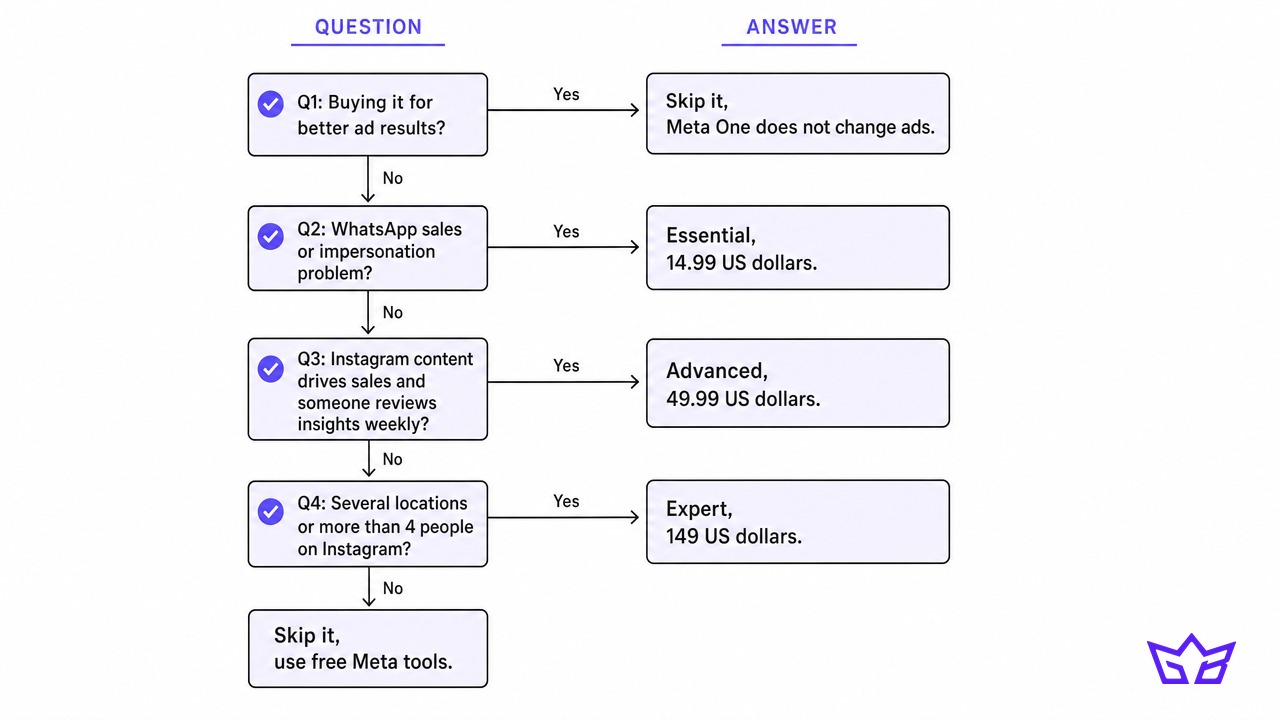 For most Canadian small businesses in September 2026, the honest answer is Advanced or nothing, and nothing is a perfectly good answer.
What to Do This Week
Open the Meta One option in your Instagram app and screenshot what it offers your account and at what price. Then pull up the Meta Ad Library, search your three closest competitors and look at what they are running. That free exercise tells you more about your competitive position than a month of paid benchmarks.
If the bigger question is whether your Meta spend is working at all, that is where we can help. Our Facebook and Instagram ads team manages Meta Ads from $750 a month, and our marketing packages bundle ads with content if you want both handled. Get in touch and we will tell you honestly whether Meta One belongs in your stack, or whether your budget belongs somewhere else.
Frequently asked questions
Is Meta One worth it for a small business?
For most small businesses, only the Advanced tier at US$49.99 a month has a clear payoff, and only if Instagram content drives sales and someone uses the insights weekly. Essential makes sense if you need the verified badge or run sales through WhatsApp. Everyone else can get by on Meta's free tools.
How much does Meta One cost?
Meta's published business prices are US$14.99 a month for Essential, US$49.99 for Advanced, US$149 for Expert and US$499 for Max, each per Facebook Page, Instagram profile or WhatsApp Business number. Personal plans start at US$2.99 for a single app. Meta says pricing can vary by region, so confirm the price your app shows.
Is Meta One available in Canada?
Meta says Meta One is rolling out gradually, is not available in all regions and decides availability based on your business activity. Meta has not published Canadian dollar pricing. The quickest way to find out is to start the subscription flow in your Instagram or Facebook app and see what it shows your account.
Does Meta One replace Meta Verified?
Meta says it is "bringing the best of Meta Verified into Meta One," and every business tier includes the verified badge after verification. Current Meta Verified subscribers keep their plans for now, and Meta says it will notify them when they can switch.
Does Meta One improve ad performance?
No. Meta One adds publishing, insights, support, verification and WhatsApp features, but nothing that changes ad delivery, bidding or costs in Ads Manager. Its audience and competitor insights can inform your creative, which is the only indirect way it touches ads.
Is Meta AI for business free?
Meta says its new Meta AI business features, including ad account analysis and reports in Google Docs, Sheets and Slides, are free to start, with Meta One positioned as the upgrade for businesses that want more. Meta AI recommends changes but does not edit your campaigns.
Reviewed by Keston Leader under our editorial policy.